Migration Guide | Moving to the New MX Support Portal
Last updated: July 1, 2026
We are upgrading your support experience! To provide you with more flexibility and better tracking, we are migrating away from Zendesk to Pylon Labs.
This guide outlines the key changes you’ll see regarding ticket statuses, communication, and how you access your account.
What is not changing during the transition:
1. The MX Support Portal URL:
The URL of https://support.mx.com will be staying the same during the transition. You may see an hour or 2 of interruption as DNS Records and other backend systems update
2. Ticket Escalations and re-prioritization.
Continue using your current channels for tickets requiring escalation or re-prioritization. After migration, we will expand this program to improve awareness and support for you and your teams.
What changes you will notice going forward:
1. New Ticket Statuses
You will notice some changes in the terminology used to describe where your request stands.
Zendesk (Old) | Pylon (New) | Definition |
|---|---|---|
New | New | We received the request and it is awaiting assignment. |
Open | On-MX | The assigned team member is actively working on the request. |
On-Hold | On Hold | We are waiting on a third party or internal resource. |
Pending | On-You | We require more information from you to proceed. |
Solved/Closed | Closed* | The issue is resolved. |
*Note on "Re-opening" Tickets: In our new system, no ticket has a "final" closed status. If a ticket is closed but you need help, reply to the email notification or respond in the portal with new information. The ticket will automatically return to the appropriate status with the same ticket number, preserving all history in one place. This may affect historical reports if your teams reopen tickets.
2. Ticket IDs & Tracking
With the move to Pylon, our ticket ID numbers will reset and start over. Please make sure to adjust and update any material you may have internally to match.
New ID Sequence: You will see a new sequence of numbers for all requests moving forward.
New URL Structure: Since we are moving away from Zendesk, you will see a new ticket URL structure.
Old URL Structure: https://support.mx.com/hc/en-us/requests/1234567
New URL Structure: We have removed the need to send over full URL’s, you simply need the ticket id.
Referencing Old Issues: We still have all your history! We are tracking your old Zendesk IDs in our backend and you will be able to search for these tickets in the new portal.
If you are reaching out about a previous issue, please include the old Zendesk ID so we can quickly link the two.
Replying to old Zendesk tickets will not work. You will need to search for the Zendesk Ticket ID in the new Portal and respond via the new ticket to interact with anything historical.
Searching for archived / migrated tickets: There are 2 ways to search and retrieve archived tickets.
All archived tickets will have the original Ticket ID pre-pended to the original subject line. This will allow for the standard search box to be used when looking up archived tickets.
3. Unified Email Communication
To improve security and routing, we are moving away from unique, ticket-specific email addresses.
The Change: All correspondence will now come from technical.support@mx.com.
Legacy Structure: Previously, you saw addresses like: support+xxxxxxxx@moneydesktop.zendesk.com.
Client Action Required: If your team uses automated systems or parsers to organize incoming support email and additional notifications from the new system, please update them to recognize the following email addresess.
technical.support@mx.com as the sender for ticket details and communications
notifications@usepylon.com for authentication and one-time passcodes
4. Enhanced Security & Login
We are implementing a more secure "passwordless" login experience.
Email First: Enter your email address on the login page.
One-Time Passcode (OTP): You will receive a code via email. Enter this code to gain access.
Please make sure to check your Spam folders if you do not receive the code in your inbox.
You may also add notifications@usepylon.com to you contact list to ensure you are receiving all communications
Account Selection: If you manage multiple organizations, you will be prompted to select the specific account you wish to view.
Explicit User Creation: Self sign-up will no longer be an option and new user creation will now be able to be managed by named Admins within the organization or need to be created by an MX Team Member
All users who are present in the current portal will be migrated over to the new portal
Client level administration will be enabled post-launch. If this is necessary sooner than that, please reach out and we can work with you to identify an administrator of your organization.
Visibility Note: By default, you will see your own tickets. If your role requires a "Global View" to see all tickets across your entire company, please contact us so we can set up a top-level account user for you.
5. User Interface and Usability
A simplified layout with direct visibility in to your tickets and access to information is now your landing page.
Reduction in the number of forms to get help. We will be removing older unused ticket forms to improve ease of use and reduce confusion.
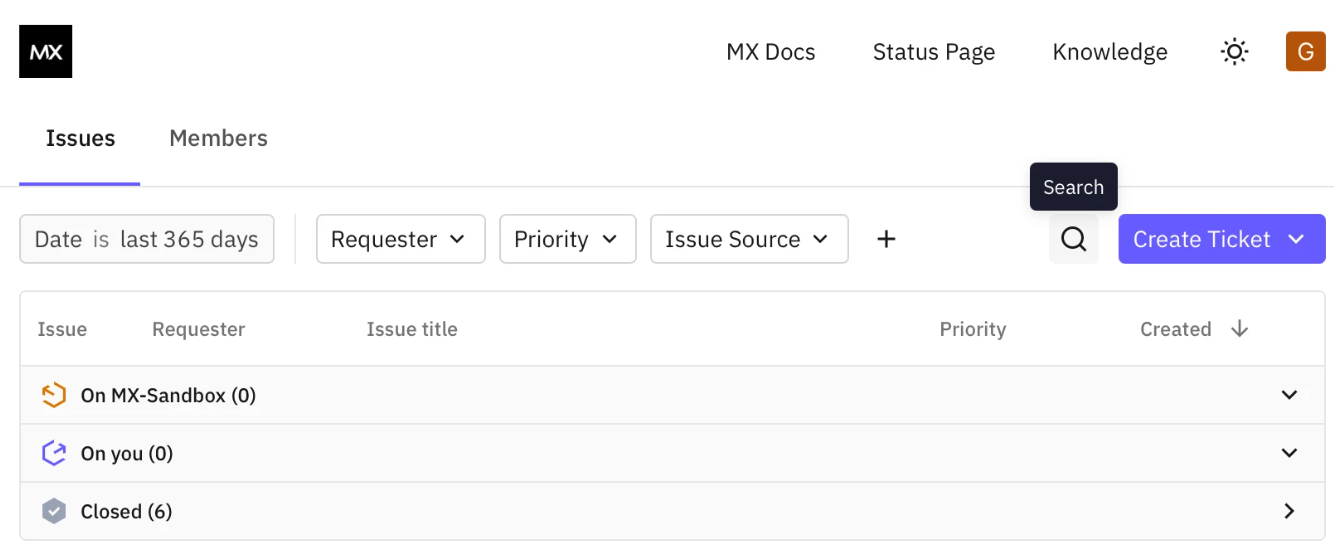
6. Live Chat and Virtual Agents (Coming early June)
A new live chat experience is coming soon. More information will follow post-launch.
We will disable the Live-Chat option during the migration, but don't worry, this will back online very soon.
7. Knowledge Base Help Articles
We are introducing a new dedicated knowledge base and article site. The new site can be accessed at help.mx.com. It offers best practices, troubleshooting tips, and FAQs.
Related Resources
Resource | Working with the MX Support Team
Migration Guide | How to Access and Use the New MX Support Knowledge Base
Migration Guide | MX Support Portal Platform Migration | Quick Start Guide
Migration Guide | Creating Tickets in the MX Support Portal